Vue.js の状態管理ライブラリ Vuex のはじめかた -『Vue.js』
- uto usui
- //
- javascript
- Vue.js
Vuex は Vue.js の状態管理ライブラリです。状態管理ライブラリとは、散らばったコンポーネントそれぞれにデータを持たせるのではなく、Vuexで言うと store の state と呼ぶところにデータを集約させ、それを介してコンポーネント同士にデータをやりとりさせ、処理の流れを一貫させたり、データの見通しを良くするために利用します。
また、MVVMのデザインパターンにおいては、Model の役割を果たします。ざっくり言うと、各コンポーネントの <template> 部分が View 、<script> 部分が ViewModel ですね。ただ、Vuex で MVVM するには、ちょっとルール作りや決め事をする必要があるかもしれません。
Vuexをはじめる
インストールします。
terminal
yarn add vuex --dev
Vuex の Store を理解する
Store には state mutations actions getters を定義します。(sに注意)
Store/index.js
import Vuex from 'vuex'
import Vue from 'vue/dist/vue.common.js'

Vue.use(Vuex)

const store = () => new Vuex.Store({

  state: { ... },
  mutations: { ... },
  actions: { ... },
  getters: { ... }

})

export default store
Store は非常にシンプルな構成になっていますが、後述しますが、階層構造を持たせることで名前空間を持たせ、モジュール化させることも可能です。
Vue インスタンスに Store を渡します。
index.js
import Vue from 'vue/dist/vue.common.js'
import Store from './store/index.js'

// Vue root
new Vue({
  Store,
  // ...
})
Vuex のデータフロー
まず Vuex のデータフローの公式図解を見てみます。
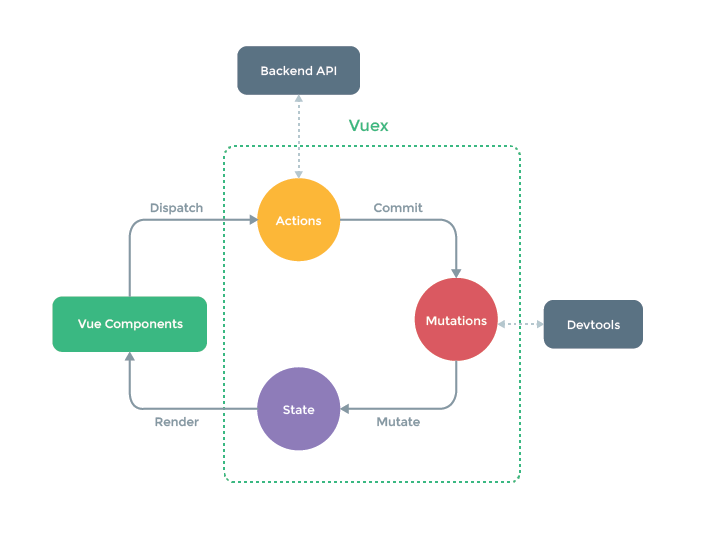
データは state が保持していて、コンポーネントに呼び出される。データの更新が必要なとき、コンポーネントは dispatch メソッドで action を呼び出して、 action は API などと非同期通信をして値を受け取り、その値を commit メソッドで mutation を呼び出して渡す。そして mutation が state の値を更新する。
というようなサイクルを上の図は表しています。 Action が必ず commit して mutation を呼び出すだけでなく、 コンポーネントは直接 commit して mutation を呼び出すことも可能になっています。
イメージしにくいかもですが、重要なのは mutation が state を書き換えることができるということです。
state – 状態
- store のデータをここで保持
- componentの
data: function() {returen { ... }}のようなもの - mutation にのみ変更される
Store/index.js
  state: {
    counter: 0
  }
component.vue
<template>
  <div>
    {{$store.state.counter}}
  </div>
</template>

<script>
  console.log(this.$store.state.counter);
</script>
mutation – stateの変更
- state を変更する
- commit で呼び出される
まず Store に定義します。
store/index.js
  mutations: {
    increment (state, payload) {
      state.counter++
    }
  }
payload はオプション引数です。
呼び出し側は、まず Store で定義したincrement と同じ関数名で、コンポーネントの中でも利用したい場合は、
component.vue
import {mapMutations} from 'vuex'

  methods: {
    ...mapMutations([
      'increment'
    ])
  }
のように書きます。
呼び出したコンポーネントで、ローカルな名前をつけたい場合は、
import {mapMutations} from 'vuex'

  methods: {
    ...mapMutations({
      localIncrement: 'increment'
    })
  }
また、このようにも書けます。
  methods: {
    increment(val) {
      this.$store.commit('increment', val)
    }
  }
先に挙げた ...mapMutations で呼び出すと、commit() を省略して書くことができます。
action – 非同期ロジック
- commit して mutation を呼び出す
- 非同期処理を書く、Promise を返す
- APIから値を受け取る
- ルートのステートやゲッター、別の action にアクセスできる
- state を変更しない
- dispatch で呼び出される
store/index.js
  actions: {
    number ({commit, dispatch, state, rootState, getters, rootGetters}, payload) {
      commit('number', payload)
    }
  }
action は受け取る引数が多く、getter や他の action に処理をつなげるなど、複雑な加工ができます。ただし、ここから直接 state を変更しないようにします。
呼び出しは、mutation と同じように書けます。
component.vue
import {mapActions} from 'vuex'

  methods: {
    ...mapActions([
      'number'
    ])
  }
import {mapActions} from 'vuex'

  methods: {
    ...mapActions({
      localNumber: 'number'
    })
  }
action と mutation の違いは、 dispatch() で呼び出すことです。
  methods: {
    number(val) {
      this.$store.dispatch('number', val)
    }
  }
非同期処理のサンプルを書いておきます。
store/index.js
  actions: {
    increment ({commit}) {
      commit('increment')
    },
    number ({commit}, value) {
      commit('number', value)
    },
    async timers ({dispatch}) {
      let delay = await dispatch('timer', 1000)
      console.log(delay)
      delay = await dispatch('timer', 3000)
      console.log(delay)
      console.log('finish')
    },
    timer ({commit}, delay) {
      return new Promise((resolve, reject) => {
        setTimeout(() => {
          resolve(delay)
        }, delay)
      })
    }
  }
component.vue
<template>
  <button @click="timers">timer</button>
</template>

<script>
  import {mapActions} from 'vuex'
  export default {
    methods: {
      ...mapActions([
        'timers'
      ])
    }
  }
</script>
getter – stateのフィルタ
- コンポーネントに値を返す
- state をフィルタリングする
- 値の加工をここでしないように注意
store/index.js
getters: {
  count(state, getters, rootState) { ... }
}
引数を渡したい場合は、このように書きます。
getters: {
  count: (state) => (arg) => state.count[arg]
}
memo
MVVM パターンでは、Model に getter は書かないという原則がありますが、Vue には getter があります。
これは、storeの値を切り出したり、加工して使いたいとき、処理を各コンポーネントのに書いたり、それを import して使い回すことに対してのヘルパー的な機能です。
ただここで、getter に色々な役割を持たせると、ViewModel と Model に処理が散らばる可能性が大きいので、store をフィルタリングする、一部を切り分けて取り出すことのみに利用する、というようにルール付けしておくのが有効です。
Vuex の応用的なTips
双方向バインディング (v-model)
computed 算出プロパティにセッターを定義して、v-model などのバインディングを実装します。
component.vue
<template>
  <div>
    <input type="text" v-model="counter">
    <button @click="increment">{{ counter }}</button>
  </div>
</template>

<script>
  import {mapActions} from 'vuex'

  export default {
    methods: {
      ...mapActions([
        'increment'
      ])
    },
    computed: {
      counter: {
        get: function () { return this.$store.state.counter },
        set: function (val) { this.$store.dispatch('number', val) }
      }
    }
  }
</script>
store/index.js
import Vuex from 'vuex'
import Vue from 'vue'

Vue.use(Vuex)

const store = () => new Vuex.Store({

  state: {
    counter: 0
  },
  mutations: {
    increment (state) {
      state.counter++
    },
    number (state, value) {
      state.counter = value
    }
  },
  actions: {
    increment ({commit}) {
      commit('increment')
    },
    number ({commit}, value) {
      commit('number', value)
    }
  }

})

export default store
Storeのモジュール化 (名前空間)
namespaced: true でStoreを入れ子に、階層を持たせ名前空間を確保できます。
const Layout = {
  namespaced: true,
  state: {
    layoutData: 'this is layout'
  },
  mutations: {},
  actions: {
    layoutAction({commit}) {
      // root の Mutation を呼び出す
      commit('rootMutation', null, {root: true})
    }
  }
};

const Meta = {
  state: {},
  mutations: {},
  actions: {},
  getters: {}
};

export default new Vuex.Store({
  state: {
    rootData: 'this is root'
  },
  mutations: {
    rootMutation(state) {
      console.log(state.rootData);
    }
  },
  modules: {
    Layout,
    Meta
  }
})
呼び出すときは、第一引数にパスを与えます。
methods: {
  mapActions('Layout', [
    'layoutAction'
  ])
}
Vuex の導入にあたって
Vue.js で綺麗に MVVM を実装するのには Vuex はとても有用で、大規模開発にいいという情報もおおいですが、単一コンポーネントで開発するなら迷わず導入してしまって構わないと思います。普段から慣れてしまって、Vuex のデータフローに馴染んでおくことが大事だなーとも思います。
MVVM のまとめ (おまけ)
View
- UI と UI の描画に必要なロジック
- ViewModel に依存
- なにかを実行するとき ViewModel の コマンドを叩く
ViewModel
- Presentation ロジックと State (データ)
- Model に依存
- View が叩いたコマンドを Model へ Dispatch (発信)する
- Modelを監視する
- View と双方向データバインディング
- Viewに揮発性のあるデータを送るときはMessengerを発行
Model
- Business ロジックと Domain を持つ
- View と ViewModel に依存しない
- 自身を更新するための関数
- 自身が更新された場合はイベントを発火する
おわります。